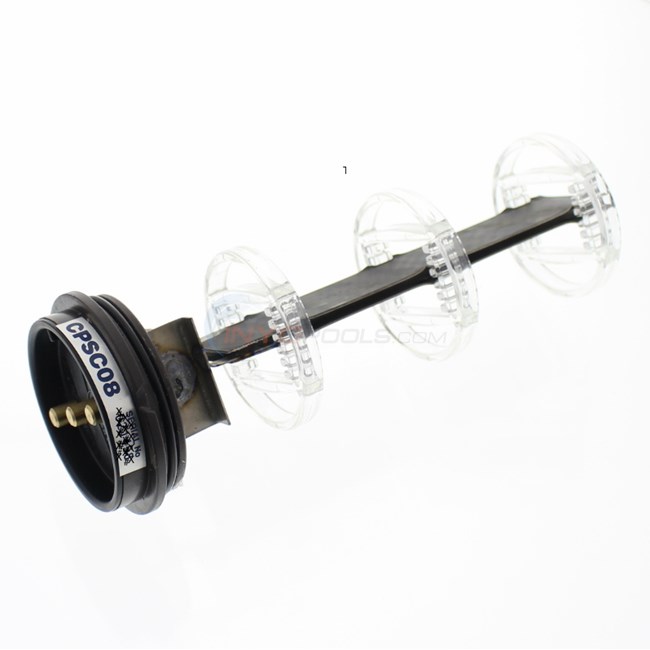
Your trouble shooting tips say to reference your guide to set the cell id on compupool systems. I cannot find your instructions anywhere. If they are available please reply.
Contacting this company is impossible.
Thanks for the help,
Jay
Your trouble shooting tips say to reference your guide to set the cell id on compupool systems. I cannot find your instructions anywhere. If they are available please reply.
Contacting this company is impossible.
Thanks for the help,
Jay
In case my note was not clear. I’m looking for instructions to reset the cell I’d on my compupool system.
Thank you.
Jay1956, We don’t have those instructions in our guides yet. This is the procedure: CPX Cell Select: This does not normally need to be changed as the Cell size is selected upon initial start up. If the incorrect cell is accidently selected upon start up, change the selection using the UP and DOWN buttons and then press SELECT. Note: If you don’t know what cell you have (faded or missing label) you can determine it by counting the number of plates in the cell. I think those numbers are: CPX16 - 3 plates, CPX24 - 4 plates, CPX36 - 5 plates and CPX48 - 7 plates. I have a call into Compupool to confirms these counts and will post a correction is wrong.
Thanks Dennis! I’m showing on the CompuPool CPSC systems that the blade count on the cells are
CPSC16 Cell = 4 Blades
CPSC24 Cell = 5 Blades
CPSC36 Cell = 7 Blades
CPSC48 Cell = 10 Blades
You may also be able to find a lable on the salt showing your model, see example below.
I can seem to get it past the "non genuine " error. I’ve tried the superclor/winter mode thing to get it into maintenance mode but it won’t work. Not sur what else to do.
Disappointing that this can’t be fixed.
Jay,
Were you ever able to get in touch with CompuPool they can be reached at (888)-989-7258
From Jay1956
Not on that number. I used 888-798-7665 and got though. I could get into work yesterday but today it seems fine, which it even more of a problem. Now I really don’t know what to do. As long as it’s ending I guess I’ll just let it go.